A digital asset management system is software that organizes stores, retrieves and distributes marketing content such as images, videos, PDFs and brand guidelines. Cloud based digital asset management (cloud DAM) delivers that system as a secure online platform with no hardware to install and no servers to manage.
As digital transformation accelerates and remote work becomes the norm, the shift from on-premise storage to cloud DAM is no longer optional for most organizations. What used to be a bold “cloud first” policy is now a given and the days of digital asset management being run off hard storage are over. Marketing teams today produce more content than ever while compliance reviews grow tighter. Scattered folders and emailed files create risk delay and frustration. Cloud DAM solves all three by giving every stakeholder one source of truth accessible from any browser.
This page explains how online digital asset management systems work, how they compare to on-premise alternatives and how to evaluate and implement the right platform for your team.
For a broader introduction to the category, see IntelligenceBank’s ultimate guide to digital asset management.
Online Digital Asset Management At-a-Glance
| What it is | A cloud-hosted platform for organizing, securing and distributing marketing content |
| Also known as | Cloud DAM, cloud-based DAM, SaaS (software as a service) DAM, online DAM |
| Core functions | Metadata and search, approval workflows, version control, AI-powered tagging, permissions management, analytics |
| Common file types managed | Images, videos, audio, PDFs, ads, presentations, creative files, brand guidelines, templates |
| Key customers | Marketing Leaders, Brand and Creative teams, Marketing Operations, Marketing Compliance Reviewers, Sales, IT |
| Deployment model | Cloud-hosted SaaS — accessed through a browser, no local installation required |
| Infrastructure | Vendor-managed servers, automatic updates, elastic storage, content delivery network (CDN) |
| Typical integrations | CMS, CRM, creative tools (Adobe Creative Cloud), marketing automation, social media platforms |
What Is an Online Digital Asset Management System?
An online digital asset management system is a cloud-hosted platform that enables organizations to store, organize, find, share and track approved marketing content from a browser, without requiring local servers or IT-managed infrastructure.
Unlike basic file storage, a cloud DAM applies structured metadata, automated workflows and intelligent search to make marketing content immediately discoverable and usable across teams and regions. It manages the full marketing content lifecycle: from upload and tagging, through review and approval, to distribution and archiving.
What Qualifies as a Digital Asset?
A digital asset is any file that carries commercial or organizational value. In a marketing context, that typically includes:
- Images (product photography, campaign creative, stock imagery)
- Videos (ads, brand films, social content, tutorials)
- Audio files (voiceovers, brand sound, podcast recordings)
- Documents and PDFs (fact sheets, sales decks, legal disclosures)
- Presentations
- Creative source files (Photoshop, Illustrator, InDesign)
- Brand guidelines and creative templates
- Ad creative (display, social, search)
What distinguishes a digital asset from a generic file is that it has defined value and needs to be managed, tracked and controlled — not just stored.
How Online DAM Differs From Cloud Storage
Cloud DAM and cloud storage tools like Google Drive, Dropbox, SharePoint and OneDrive solve different problems. Cloud storage holds files. Cloud DAM manages marketing content throughout its lifecycle.
| Cloud DAM | Cloud Storage (Drive, Dropbox, SharePoint) | |
|---|---|---|
| Search | Metadata-driven, AI-powered search across attributes | Folder navigation and filename search |
| Organization | Structured taxonomy, custom fields, AI tagging | Manual folder hierarchies |
| Workflows | Automated review, approval and version control | Manual email or chat-based coordination |
| Permissions | Granular, role-based access with audit trails | Basic sharing with limited permission tiers |
| Version control | Tracked versions with clear approved state | File duplication and naming conventions |
| Distribution | Controlled sharing with expiry links, portals, CDN delivery | Direct file sharing with limited controls |
| Analytics | Asset usage, download and engagement tracking | Minimal or no usage reporting |
The practical difference is significant. Cloud storage creates a place to put files. Cloud DAM creates a system for managing marketing content along with the controls, intelligence and automation that Marketing and Marketing Compliance teams actually need.
How Cloud Digital Asset Management Systems Work
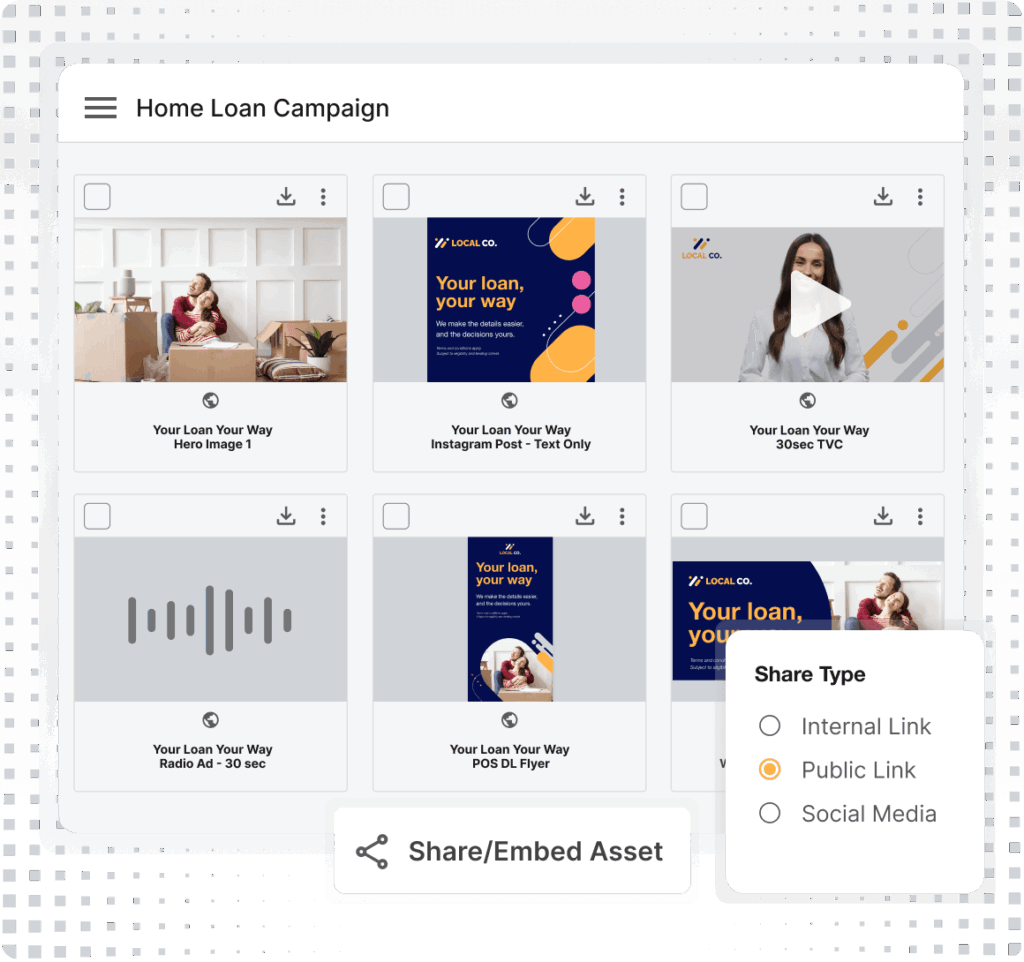
A cloud digital asset management system manages the full content lifecycle through four interconnected capability areas. Because it is cloud-based, these capabilities are available to every authorized customer – anywhere, on any device – without VPN access or local network dependency.
Metadata and Intelligent Search in Cloud DAM
At the center of every cloud DAM is a structured metadata framework. Unlike folder-based systems that depend on human memory and consistent naming conventions, a cloud DAM automatically categorizes files with searchable keywords, custom fields, descriptions, rights information and usage restrictions.
AI-powered asset tagging extends this further, automatically identifying objects, scenes, colors and text within images and videos which eliminates hours of manual tagging and making assets discoverable immediately after upload. For Marketing Leaders managing libraries of thousands of images and videos, this capability alone transforms how teams find and reuse existing marketing content. Learn more about metadata for digital asset management.
Automated Workflows and Version Control
Cloud DAM systems replace fragmented email threads and manual review processes with structured, trackable approval workflows. Marketing content can be routed automatically to the right reviewers, for example Brand Managers, Marketing Compliance Reviewers, legal stakeholders or external partners based on content type, channel or risk level.
Version control ensures that every customer always accesses the latest approved asset, not an outdated file from a shared drive or email attachment. Every version is retained, timestamped and auditable. Combined with approval workflows, this eliminates one of the most persistent sources of brand risk: teams unknowingly distributing outdated or unapproved marketing content.
AI-Powered Features in Cloud Digital Asset Management
Modern cloud DAM platforms use artificial intelligence to automate tasks that previously required significant manual effort. Key AI capabilities include:
- Image, video and audio tagging: Automatically identify and tag objects, scenes, brands and locations across large asset libraries
- Facial recognition: Quickly locate specific people across thousands of images and videos for rights management and campaign tracking
- Automatic transcription: Generate text transcripts from video and audio files for repurposing and accessibility compliance
- Smart cropping: Instantly resize and reformat batches of images to a defined focal point for different channels and placements
- AI content risk detection: Flag potential marketing compliance issues in ads, social posts, PDFs and web content before they reach reviewers
These capabilities, available through IntelligenceBank AI, accelerate time-to-market and reduce the manual overhead that slows down Marketing and Creative teams.
Cloud Security, Permissions and Compliance
Security is often raised as a concern about cloud deployment. In practice, cloud DAM platforms deliver enterprise-grade security that most on-premise environments cannot match. Key protections include:
- Role-based permissions, so each customer accesses only what they need
- Encryption in transit and at rest
- SOC 2 compliance and ISO 27001-aligned controls
- Single sign-on (SSO) integration with identity providers
- Comprehensive audit trails covering every view, download and share event
- Controlled distribution through expiry-enabled links and permissioned brand portals
For regulated industries — banking and finance, healthcare, insurance — these controls are not a convenience; they are a requirement. Learn more about IntelligenceBank’s approach to enterprise security.
Cloud-Based DAM vs On-Premise DAM
Cloud-based DAM is hosted and maintained by the software vendor and accessed through a browser, while on-premise DAM runs on servers owned and managed by the organization itself. For most organizations, cloud DAM is now the default, but understanding the differences helps clarify why.
| Dimension | Cloud DAM | On-Premise DAM |
|---|---|---|
| Hosting | Vendor-managed cloud infrastructure | Organization's own servers or data center |
| Access | Browser-based, any device, any location | Typically requires VPN or local network |
| Upfront cost | Low, subscription-based with no hardware | High, servers, licenses and setup costs |
| Ongoing cost model | Predictable SaaS subscription | Ongoing maintenance, IT staffing, upgrades |
| Maintenance and updates | Automatic, vendor handles all updates | Manual, IT team responsible for updates and patches |
| Scalability | Elastic, storage and users scale on demand | Limited by physical hardware capacity |
| Security responsibility | Shared, vendor manages infrastructure security | Organization-managed end to end |
| Implementation timeline | Weeks to months | Months to years |
| IT resource requirements | Minimal, vendor-managed infrastructure | Significant, dedicated IT team required |
| Best for | Distributed teams, growing organizations, regulated industries needing auditability | Organizations with strict data residency requirements or heavily customized legacy workflows |
Most organizations are moving toward cloud DAM as part of broader digital transformation. On-premise deployment may still suit organizations operating under jurisdiction-specific data residency requirements or those with deeply embedded custom workflows built around legacy systems. For everyone else, cloud is faster to deploy, easier to maintain and more cost-effective at scale.
Benefits of an Online Digital Asset Management System
Online digital asset management systems deliver benefits that on-premise DAM and basic cloud storage cannot replicate. This is because the platform is cloud-hosted, continuously updated and accessible from anywhere.
- Access marketing content from anywhere: Authorized customers can find, download and share approved content from any device, without VPN access or waiting for someone in the office to send files
- Scale storage elastically: As asset libraries grow, cloud DAM storage scales automatically – no hardware procurement, no IT tickets, no storage limits that require manual management
- Reduce IT overhead: Vendor-managed infrastructure means no server maintenance, no manual updates and no internal IT team required to keep the platform running
- Enable real-time collaboration: Marketing Leaders, Creatives, Marketing Compliance Reviewers and external partners work from the same platform simultaneously, in any time zone
- Improve brand consistency: A single, cloud-accessible source of approved marketing content means every team and every region uses current, correct assets – reducing brand risk across all channels
- Reduce marketing compliance risk: Centralized permissions, audit trails and controlled distribution reduce the risk of unapproved content reaching market or failing a regulatory review
- Accelerate time-to-market: Automated approval workflows and instant access to pre-approved content eliminate the delays caused by manual processes and asset searches
- Track marketing content ROI: Built-in analytics reveal which assets are downloaded, shared and used — giving Marketing Leaders data to inform content investment decisions
To quantify the financial impact of cloud DAM for your organization, we’ve created a complete guide that allows you to quantify the ROI of a DAM.
How Cloud DAM Systems Streamline Marketing Operations
Cloud digital asset management systems reduce operational friction for distributed and remote marketing teams by replacing fragmented, manual processes with a single, automated content workflow.
Without a cloud DAM: A salesperson needs a product image for a client presentation. They email a Marketing Leader who spends 15 minutes searching through a shared drive and email attachments. They find 3 similar versions, are not sure which is current and forward all of them. The salesperson uses an outdated file presenting incorrect product information to a prospective customer.
With a cloud DAM: The salesperson accesses the DAM portal from their laptop at the client site. No request needed. They search by product name, filter by “approved” and “latest version,” and find the correct asset in seconds. They download it directly or copy a secure, expiry-enabled link. The entire process takes under a minute with no involvement from the Marketing team and no brand risk.
This efficiency extends across daily operations:
- Onboarding new team members by giving them immediate access to the brand library through online brand portals, rather than relying on someone to share folders manually
- Managing global campaigns with region-specific asset libraries and permissions — so teams in different markets access relevant, approved content without email chains
- Gathering feedback through shared review links with built-in commenting and proofing and markup tools, replacing scattered email threads with structured, trackable reviews
The operational impact compounds over time. Marketing teams shift from managing file chaos to managing content strategy, which ultimately, is where their effort creates the most value.
How to Choose the Right Cloud DAM System
Choosing a cloud digital asset management system requires evaluating criteria that are specific to cloud deployment rather than just general feature comparisons. The right platform for your organization depends on how your team works, where your marketing content currently lives and what marketing compliance and integration requirements you need to meet.
Here are 8 criteria to prioritize:
- Security certifications and marketing compliance controls: Look for SOC 2 Type II certification, encryption in transit and at rest, role-based access, audit trails and SSO integration. For regulated industries, confirm alignment with relevant industry standards (HIPAA, FINRA, GDPR).
- Uptime service level agreements (SLAs) and disaster recovery: Understand what uptime the vendor guarantees and how they handle outages and data recovery. A cloud DAM that goes down mid-campaign creates real business impact.
- Migration support: Most organizations have existing marketing content scattered across shared drives, local machines, email and legacy systems. Confirm the vendor provides structured migration support, including asset inventory, metadata mapping and bulk upload tools.
- Integration ecosystem: A cloud DAM that does not connect to your existing tools creates new friction. Evaluate depth of integrations with your CMS, CRM, marketing automation platform and creative tools.
- AI and automation capabilities: Assess AI tagging depth, automated workflow configuration and AI-assisted marketing compliance review features. These capabilities determine how much manual effort the platform eliminates.
- Scalability: Confirm how the platform handles growth in storage volume, customer count and geographic regions. Elastic cloud infrastructure should mean no ceiling on growth.
- Customer experience and adoption support: A cloud DAM only creates value when teams use it. Evaluate onboarding support, training resources and in-platform experience design.
- Pricing model clarity: Understand what drives cost; per-customer pricing, storage tiers, implementation fees, API (application programming interface) accessor add-on modules. Total cost of ownership matters as much as the subscription price.
For a structured approach to vendor evaluation, download IntelligenceBank’s DAM RFP template or review the DAM software comparison guide.
AI Capability Questions to Ask When Evaluating Cloud DAM Platforms
As AI capabilities become standard across cloud DAM platforms, buyers need specific evaluation criteria to distinguish between surface-level AI features and genuinely useful functionality. Three questions are particularly important when assessing a cloud DAM’s AI capabilities. First, how does AI tagging work, and what level of accuracy should you expect? AI auto-tagging is now a baseline feature, but accuracy varies significantly depending on the platform and content type. Ask vendors for specific accuracy benchmarks and request a demonstration using your own assets. Second, does the platform include built-in compliance review, or is compliance handled by a separate tool? Most cloud DAMs do not include AI-powered compliance scanning natively. For organizations in regulated industries, or any team that needs content governance beyond basic metadata management, a DAM with integrated compliance review eliminates the gaps that emerge when content moves between disconnected systems. Third, does the platform offer post-publication AI monitoring? Assets do not stop needing governance once they are published. Evaluating whether a cloud DAM can monitor published web content, social channels, and digital advertising for compliance drift, not just pre-publication content, is an increasingly important differentiator.
These AI-specific criteria complement the cloud infrastructure questions (security certifications, uptime guarantees, data residency, migration support) that are already part of most DAM evaluations. Assessing both dimensions together ensures that the platform you select handles the full lifecycle of digital assets, from intelligent organization at upload through active governance after publication.
How to Implement a Cloud Digital Asset Management System
Successful cloud digital asset management implementation requires more than selecting the right platform. It requires a structured approach to migration, configuration, change management and integration. Organizations that treat implementation as a purely technical exercise typically see low adoption and limited return on investment.
Cloud DAM Implementation Phases
| Phase | Key Activities | Outcome |
|---|---|---|
| 1. Plan and Organize | Conduct stakeholder interviews across Marketing, Creative, Marketing Compliance and IT; inventory existing marketing content across all current locations; define metadata schema and taxonomy; design permission architecture for distributed teams; map SSO and identity provider configuration | A clear strategy and file structure plan aligned to how your teams actually search for content |
| 2. Pilot and Validate | Migrate a controlled set of marketing content; configure approval workflows for key content types; train super-customers; gather structured feedback; refine metadata and permissions | A tested, user-validated system ready for broader rollout |
| 3. Scale and Integrate | Organization-wide migration; configure integrations with CMS, CRM and creative tools; full training and enablement program; establish ongoing governance model | Widespread adoption and seamless workflows across the marketing technology stack |
Cloud-specific activities to plan for at each phase include: asset migration from shared drives, Dropbox and on-premise systems; SSO configuration with your identity provider and integration mapping for your marketing stack.
Common Cloud DAM Pitfalls and How to Avoid Them
Poor metadata strategy: The most common reason cloud DAM implementations underdeliver is inadequate metadata planning. Without a consistent, intentional taxonomy, marketing content becomes as hard to find as it was before but just in a different system.
What to do: Design your metadata schema before migration begins, based on how teams actually search for content – not just how marketing content was previously filed.
Inadequate change management: Launching a new platform without structured training and internal advocacy leads to low adoption. Teams revert to shared drives and email out of habit.
What to do: Identify DAM champions in each team, develop a phased training program and create clear internal communication about why the platform exists and what it replaces.
Overly complex permissions: Creating highly granular permission structures from day one frustrates customers and slows down legitimate content access.
What to do: Start with simple, role-based permission groups. Add complexity incrementally, only where security or marketing compliance requirements demand it.
Operating in a silo: A cloud DAM that is not connected to the tools Marketing and Creative teams use daily becomes a detour rather than a destination. Adoption drops when accessing the DAM feels like extra work.
What to do: Prioritize integrations with core systems, (particularly your CMS, creative tools and marketing automation platform), from the start.
Underestimating migration scope: Organizations consistently discover more marketing content than expected when they dig into scattered personal drives, email attachments, Dropbox folders and decommissioned systems.
What to do: Conduct a thorough content audit before migration begins. Include input from Marketing Operations, Creative teams and IT to surface all content locations.
Cloud DAM Examples Across Industries
Cloud digital asset management systems serve different needs across industries, with particular value in regulated and asset-heavy sectors where distributed access and marketing compliance controls matter most. The cloud deployment model is especially significant in these contexts – because branch-level, agent-level and site-level teams need access to approved marketing content without depending on central IT or headquarters.
| Industry | Cloud DAM Use Case |
|---|---|
| Banking and Finance | Marketing Compliance teams across branches access only pre-approved marketing materials; audit trails satisfy FINRA and SEC documentation requirements for regulated content |
| Healthcare | Distributed care networks such as hospitals, clinics and affiliated practices can access current, approved patient-facing content under HIPAA-aligned permissions without emailing files across organizations |
| Insurance | Agents and brokers across regions and distribution channels access up-to-date, compliant marketing materials; version control prevents use of outdated product disclosures or superseded disclaimers |
| Retail | Seasonal campaign assets are distributed across stores, e-commerce and social channels simultaneously, with region-specific asset libraries ensuring local relevance and brand consistency |
| Higher Education | Departments across multiple campuses maintain brand consistency through centralized, cloud-accessible online brand portals, without requiring a central design team to fulfill every request |
Across all of these industries, the cloud deployment model solves the same core problem: approved marketing content needs to reach the right people at the right time – without creating marketing compliance risk or brand inconsistency along the way.
Frequently Asked Questions About Online Digital Asset Management
What is an online digital asset management system?
An online digital asset management system is a cloud-hosted platform that enables organizations to store organize, search, share and track marketing content – including images, videos, ads, PDFs and presentations – from a single, browser-accessible location. It differs from basic cloud storage by applying structured metadata, automated approval workflows, version control and granular permissions to manage the full marketing content lifecycle.
How does cloud DAM differ from on-premise DAM?
Cloud DAM is hosted and maintained by the software vendor and accessed through a browser with no local servers required. On-premise DAM runs on servers owned and managed by the organization, requiring dedicated IT resources, manual updates and significant upfront infrastructure investment. Cloud DAM is faster to deploy, scales automatically and gives distributed teams anywhere access without VPN dependency.
How secure are cloud-based DAM systems?
Enterprise-grade cloud DAM platforms implement multiple security layers: encryption in transit and at rest, role-based access controls, SOC 2 Type II certification, SSO integration and comprehensive audit trails tracking every view, download and share event. For many organizations, cloud DAM security exceeds what their own IT infrastructure can deliver. Learn more about IntelligenceBank’s enterprise security approach.
What types of files does a cloud DAM system manage?
Cloud DAM systems manage any marketing content with organizational value: images, videos, audio files, PDFs, ad creative, presentations, brand guidelines, creative templates, source files (Photoshop, Illustrator, InDesign)and documents. Most platforms support hundreds of file formats, with preview and playback capabilities that eliminate the need to download files before reviewing them.
Who uses cloud DAM systems?
Marketing Leaders, Brand and Creative teams, Marketing Operations, Marketing Compliance Reviewers, Sales and IT all use cloud DAM in different ways. External partners – agencies, distributors and vendors – also access brand portals or shared collections. The cloud deployment model is specifically valuable for distributed organizations where customers in different locations, time zones or external organizations need access to the same approved marketing content.
How do cloud DAM systems use AI?
Cloud DAM platforms use AI to automate metadata tagging (identifying objects, scenes, faces, colors and text in images and videos), generate transcripts from audio and video files, enable natural language search across large asset libraries, apply smart cropping for multi-channel reformatting and detect potential marketing compliance issues in ads, web content and PDFs. AI-powered asset tagging eliminates hours of manual tagging and significantly accelerates content discovery.
How do you migrate existing assets to a cloud DAM?
Migration typically involves 4 steps: auditing all existing marketing content locations (shared drives, Dropbox, local machines, email, legacy systems); designing a metadata schema and taxonomy before migration begins; bulk uploading and AI-tagging content in phases; and validating search and permission accuracy before full rollout. The scope is almost always larger than initially expected – most organizations discover marketing content in more locations than they realized. A structured pilot migration with a subset of content helps surface issues before they affect the full library.
How does cloud DAM integrate with other software?
Cloud DAM platforms connect with CMS platforms, CRM systems, marketing automation tools, creative applications (Adobe Creative Cloud), social media publishing platforms and project management tools through native API integrations and pre-built connectors. Deep integrations ensure that approved marketing content flows directly to the tools where teams work – making the DAM an embedded part of daily workflows rather than a separate destination.
How scalable is cloud digital asset management?
Cloud DAM infrastructure scales elastically. Storage capacity, customer count and geographic reach expand without hardware procurement or IT projects. Organizations managing thousands of assets today can grow to millions without platform changes. Multi-region cloud infrastructure also means customers in different countries access assets from servers physically close to them, reducing load times for large files like videos.
What do cloud DAM pricing models look like?
Cloud DAM pricing is typically structured as a SaaS (software as a service) subscription, with costs driven by customer count, storage volume or a combination of both. Some platforms charge per-customer; others offer unlimited customers with tiered storage pricing. Implementation fees, migration support, API access and premium AI features may be priced separately. Total cost of ownership should account for all of these factors, not just the base subscription. Explore the ROI of a DAM to understand what a cloud DAM investment typically returns.
How does cloud DAM support brand consistency for distributed teams?
Cloud DAM creates a single source of approved marketing content accessible to every authorized customer across every location. This eliminates the local copies, shared drives and email attachments that lead to brand inconsistency. Role-based permissions ensure customers access only current, approved assets. Controlled distribution through brand portals and expiry-enabled links prevents outdated or unapproved marketing content from reaching market. For Marketing Compliance Reviewers, audit trails provide documentation of who accessed, downloaded and distributed each asset.
How do you measure cloud DAM ROI?
Cloud DAM return on investment is measured across several dimensions: time saved on asset search and recreation, reduction in rework caused by outdated or unapproved marketing content, faster approval cycle times, reduced marketing compliance risk exposure and improved content reuse rates. Most organizations also track brand consistency improvements and the reduction in agency spend on recreating assets that already exist.
Use IntelligenceBank’s ROI of a DAM framework to build a business case tailored to your organization’s cost structure.
How do I define what functionality I need from a cloud DAM system?
The most effective starting point is building a structured requirements list before speaking to any vendor. This forces clarity on what your team actually needs rather than what sounds appealing in a demo. Key areas to define upfront include metadata and search requirements, approval workflow complexity, marketing compliance controls, integration dependencies, security certifications, and storage volume. IntelligenceBank’s DAM RFP template is a free resource that walks through each of these areas in a format you can send directly to vendors, making it easier to compare responses consistently rather than trying to reconcile information gathered across different conversations.
How do I identify and shortlist cloud DAM vendors?
To get started, peer review data helps narrow the field objectively. The DAM software comparison guide draws on verified G2 reviews to show how leading cloud DAM platforms compare across categories including asset management, workflow management, brand portal capabilities, integrations with marketing and creative software, and ease of doing business with. Because the ratings reflect the experiences of real customers rather than vendor self-reporting, it provides a useful independent reference point when building a shortlist before you go deeper with vendor conversations.
Ready to see cloud-based digital asset management in action? Book a Demo or explore IntelligenceBank’s digital asset management software.