Marketing content used to start in a design tool, a document or a brief. Today, more and more of it starts in a conversation with an AI assistant. A marketer asks Claude or Copilot for a headline, a campaign idea or an image and gets one in seconds.
That speed is real, but so is the risk that comes with it. An assistant can write a claim your regulator doesn’t allow. It can pick last year’s logo, or an image whose license expired in March. It knows nothing of your disclaimers, your approval process or your audience, unless something tells it.
Everything we build at IntelligenceBank centers on making marketing content faster to make, safer to publish and proven to perform, whoever or whatever makes it. AI helps support this for our customers, further increasing efficiency and reducing risk.
That’s why we built the IntelligenceBank MCP Server, which connects your AI assistant to your IntelligenceBank platform. It works with the assistants our customers already use, including Claude, Claude Code, Microsoft 365 Copilot, ChatGPT, Gemini Enterprise and Gemini. Because it’s built on an open standard, other assistants that support that standard can connect too.
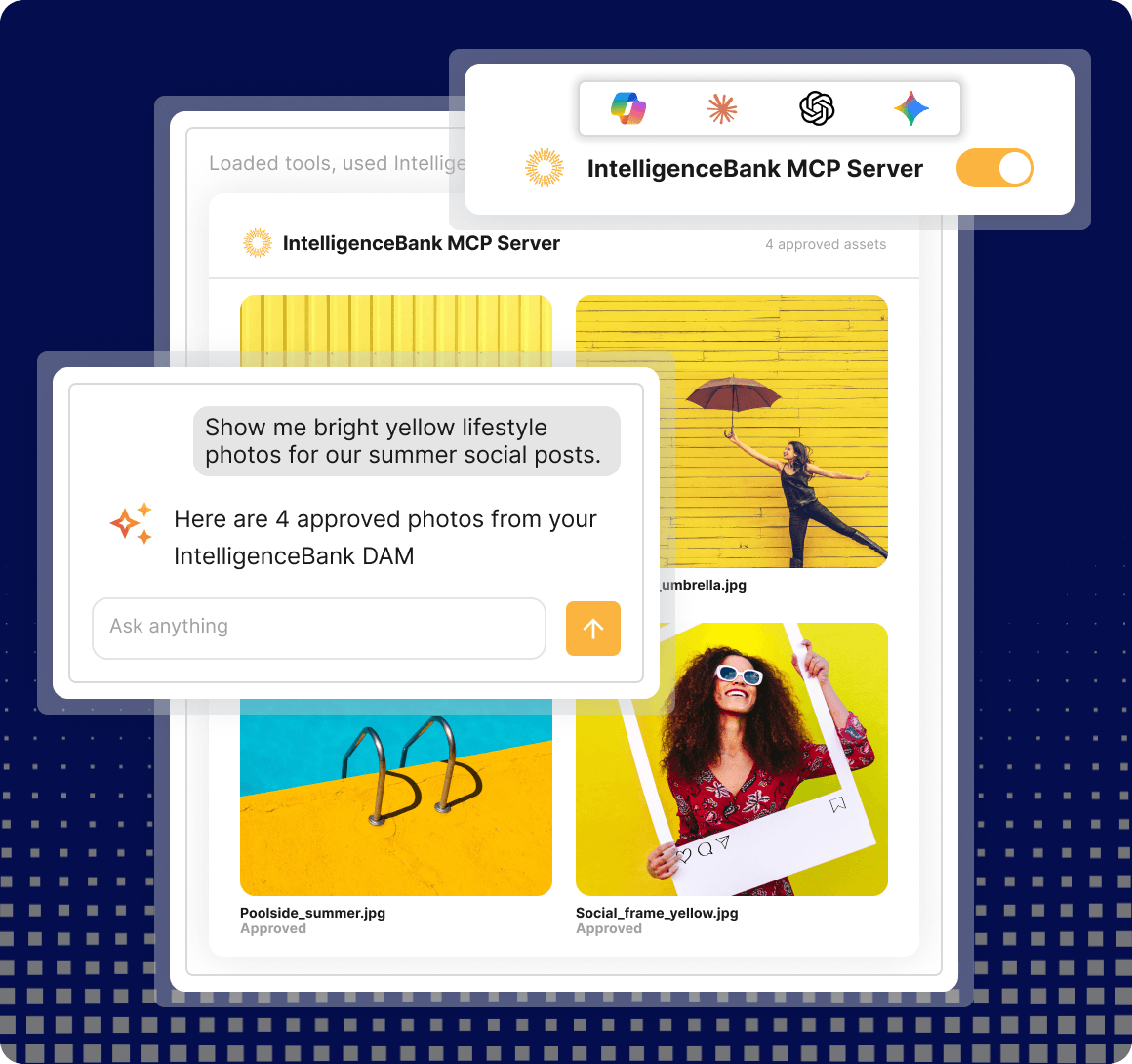
What the IntelligenceBank MCP Server can do
Our first release lets you access creative assets managed in IntelligenceBank Digital Asset Management (DAM) as well as run AI content risk reviews based on your own marketing compliance rules in IntelligenceBank.
Once it’s connected, you can ask for what you need in plain language, and the assistant uses your platform for you. For example:
- “Find our approved Q4 campaign images and show them as a gallery.”
- “Make a 1080 x 1080 JPG of our new product hero image for Instagram.”
- “Which collections are shared with the Sydney team, and which PDFs are in them?”
- “Run a content risk review on this ad copy before it goes to legal.”
Behind each request, the assistant searches your assets and collections and reads their metadata. It shows previews, prepares an image in the size or format you need and uploads files for review.. Where your subscription includes Marketing Compliance, it runs a content risk review against your own compliance, legal and brand rules. It even uses your organization’s own names for things, because it reads them straight from your platform.
Why we built the MCP Server
Our strategy has always been to meet marketers where they create. We built add-ins for Google Workspace and plugins for Figma and InDesign, so content could be checked in the tool where it was made.
AI assistants are the newest of those places, and the fastest growing. If IntelligenceBank is not there, the assistant still answers, using whatever it can find. That is how an unapproved image or an unchecked claim reaches the market.
So we looked at what makes AI-made content safe to publish and the answer is context. That includes your approved assets and your current rules, disclaimers and brand guidelines, including what was approved, by whom, and why. Our customers have built that context in IntelligenceBank over the years. The MCP Server puts it in front of the assistant at the moment content is made.
Trust, by design
When anything new connects to our customers’ platforms, our first question is whether it is safe to connect. We designed the MCP Server so the answer is yes before anyone has to ask.
- It runs as you. Each person signs in to their own IntelligenceBank platform, with single sign-on where you use it. The assistant sees what that person can see, and nothing more.
- Nothing to install, no keys to manage. IntelligenceBank hosts the server. You add one address to your assistant. There is no API key to paste, rotate or share.
- Your files stay on your platform. A download comes straight from your IntelligenceBank platform, in the region your contract names. An upload goes straight to IntelligenceBank storage. Neither passes through the MCP Server.
- Nothing is warehoused. The server holds your session and nothing else. It does not copy your files or keep the data it returns.
- You set the scope. We enable the server site by site, at your request. Administrators can connect a narrower set of tools, for example one that never uploads a file. No tool edits, moves or deletes an existing record.
One point deserves a check against your own policies. What the assistant retrieves enters your conversation, so your AI provider’s data terms apply to it.
The role MCP plays
MCP, the Model Context Protocol, is an open standard for connecting AI assistants to the systems that hold your work. A system publishes its tools once, and any assistant that speaks the standard can use them. It matters to us in two ways.
It lets you choose your assistant.
Neither we nor our customers have to bet on one AI vendor. You pick the agent, and IntelligenceBank brings the context.
It changes what an integration is.
We recently reviewed the 26 tools IntelligenceBank integrates with. Twenty-four already offer their own MCP server. They span creation tools such as Adobe, Canva and Figma, and web platforms such as AEM, Sitecore and WordPress. They also include Salesforce, Meta and Google Ads, Jira and Asana. An integration used to be a build project someone had to maintain. With MCP, the vendor maintains the server, and connecting it is configuration.
What’s next?
Our direction has three steps.
- Before: IntelligenceBank in your tools. Add-ins and plugins put assets and risk reviews inside Office, Google Workspace, Figma, InDesign and the Adobe suite.
- Now: IntelligenceBank in your agents. The MCP Server puts assets, search and risk reviews inside the AI assistant you chose.
- Next: governed creation inside IntelligenceBank. We make IntelligenceBank a safer place to create content with AI.
The third step matters because of an honest limit. In another vendor’s assistant, the MCP Server can inform the work but can’t govern it. There, a content risk review is something the assistant may or may not run, and asking for approval is still left to the person. Any agent can read your rules, but enforcing them takes one built for the job.
Compliance tells you what’s wrong and governance makes sure nothing ships unchecked. That is the job we are building the IntelligenceBank Agent for: an AI assistant inside IntelligenceBank, made for marketing content. It knows your rules, brand and process, and it records every step. It will also use MCP in the other direction. Your approved creative and publishing tools, such as Canva, Adobe or Figma will plug into it and run under your IntelligenceBank roles. A risk review becomes a gate every draft must pass. Approvals follow your workflow, every time. Compliance moves inside every step, from brief to publish, rather than coming after it.
It builds on what already runs in IntelligenceBank. Creative Templates already let your teams self-serve compliant materials. That speeds up go-to-market and removes both the design bottleneck and the compliance bottleneck. In the IntelligenceBank Agent, they will become the canvas for banners, documents and video, made from approved templates and checked as they are made.
We will also open two of IntelligenceBank’s strongest features to every agent, wherever it runs. An agent that reaches a decision it should not make alone will pause and send it to your approval workflow. It resumes once a person approves, rejects or edits. And the audit trail will record which agent acted, for which person, and exactly what was approved. That makes IntelligenceBank the system of record for marketing work done by people and AI agents alike. So we work both sides at once. IntelligenceBank goes to where you create, and gives you a safer place to create.
Back to the promise
That’s how we keep our promise. Content is fast to make because you ask for what you need in the assistant you already use. It’s safe to publish because your approved content and your own rules are there the moment it’s made, with the IntelligenceBank Agent set to enforce them end to end.
The IntelligenceBank MCP Server is available today and access to the server is free of charge. Standard API usage and limits apply. To enable the MCP Server, platform administrators can switch it on in the Admin Settings area, or ask their customer success manager. Setup steps for each AI assistant are in our Helpdesk guide, About the IntelligenceBank MCP Server.